You will need the following items:
In order to attach the new terminal to your 3B2 system, you
must first know which port you are going to connect the terminal
to. To accomplish this, you need to:

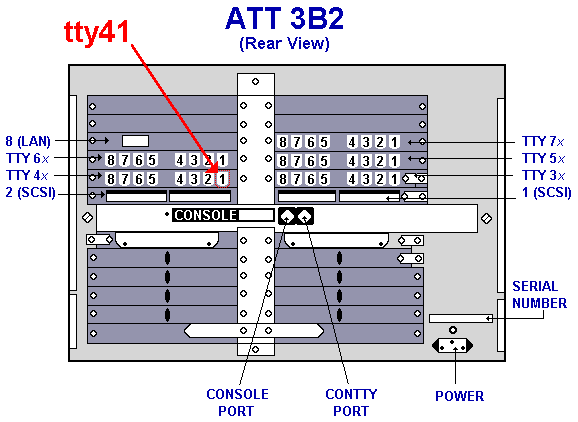
For this example, we will use port 41 (tty41). Rather than use
the ATT cable, you may substitute any type (8 wire w/ RJ45
connector) of cable that will work with the 3B2. However, the
individual wires inside the connector must appear to be continous
when connectors are held end-to-end (ie: the colors must match).
Step 1: Connecting Components
- Connect the cable into tty41 (see diagram).
- Connect the other end of the cable into the term
connector.
- Attach the term connector into the correct terminal port:
Step 2: Configuring The /etc/inittab File
Note: You will need experience in editting
system files to perform this step. You will need to edit the file
using your favorite editor, such as vi.
- Login to the 3B2 as root.
- Type
vi /etc/inittab (see partial
sample file).
- Search for the line that has tty41 in it.
- Set this port to "respawn".
- Save and exit editor.
- Type
init q.
At this point, your terminal should now be functional.
If you do not get a login prompt, following the Terminal
Troubleshooting Procedures below:
Terminal Troubleshooting Procedures
- Verify that there is power to the terminal.
- Check to see that your terminal communications settings
are correct:
- Check to see that your tty port communications settings
are correct:
Verify that the assigned port has actually been
        turned "on".
Verify that your cable is good:
Verify that your connector is good:
ATT 700 Terminal Communications Setup

- On your terminal, press [Ctrl-F1].
- Press your down-arrow key until you get to the "Communications Options"
option.
- Press [Enter].
- Change your options to match those below.
| Main/Port 2 |
| 9600 |
Speed |
| 1 bit |
Stop Bits |
| 7 bits |
Data Bits |
| space |
Send Parity |
| no |
Check Parity |
| off |
Local Echo |
| XON/XOFF |
Generate Flow |
| none |
Receive Flow |
| no |
Answerback on Connect |
| yes |
Clear Communications
Ports |
[footer1.html] bot="Include" endspan i-checksum="3102"