Upper Cover ASM


Upper Cover ASM


To remove the upper case:
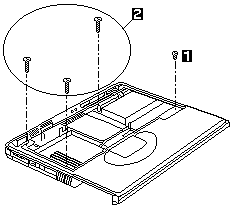
  1.  Remove the screws from the upper cover ASM.
     

    Step Size (Quantity) Head & Color Torque
    1 M2 x 4L (3) Flat head, silver 1.6 kgf-cm
    2 M2 x 18L (3) Pan head, black 1.6 kgf-cm

     
    Note: Make sure you use the correct screw for replacement.  
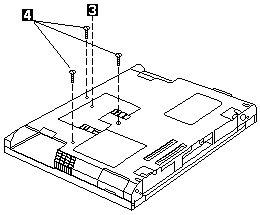
  2.  Turn the notebook over. Then remove the 4 screws  from the base cover.
     

    Step Size (Quantity) Head & Color Torque
    3 M2.5 x 6L (1) Flat head, black 2.0 kgf-cm
    4 M2.5 x 18L (3) Pan head, black 2.0 kgf-cm

     
    Note: Make sure you use the correct screw for replacement.  
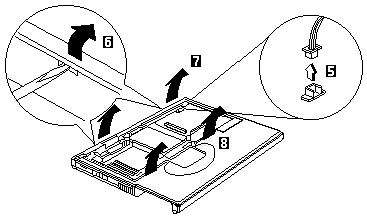
  3.  Use a flat-bladed screwdriver to remove the latch.
  4.  Disconnect the cable from the main unit. Now you  can remove the upper cover ASM from the base cover ASM.


Back to  Jump to TOP-of-PAGE

Please see the LEGAL  -  Trademark notice.
Feel free - send a Email-NOTE  for any BUG on this page found - Thank you.