 Before running PQA Diagnostic program, make sure that
the write enable tab of the Diagnostic Program Disk is set to enable.
Before running PQA Diagnostic program, make sure that
the write enable tab of the Diagnostic Program Disk is set to enable.
| FDD | Erasable 2HD diskette |
|---|---|
| Parallel | Wrap plug (P/N 72X8546) |
| Serial | Wrap plug (P/N 72X8546) |
| PCMCIA | PC test card (P/N 35G4703) |
| CD-ROM | Any data and audio CDs |
| ThinkPad 310 Diagnostics Diskette (P/N 05L1936) | |
| ThinkPad 310 Maintenance Utility Diskette (P/N 05L1770) |
Boot from the Diagnostics Program Disk and select PQA System Diagnostics Program from
PC DOS 7.0 Startup Menu. The PQA main menu appears on screen.
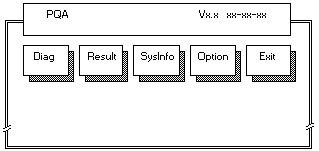
Press > or < to move around the main menu. Press Enter to enable the selected option. The main options are Diag, Result, SysInfo, Option and Exit.
The Diag option lets you select testing items and times.
The following screen appears when you select Diag from the main menu.
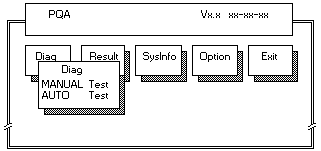
This screen allows you to specify the number of tests to perform. The options are as follows:
- Manual Test Performs a single test and checks the selected items in sequence.
- Auto Test Performs multiple tests of the selected items and checks the selected test items in sequence.
The screen below appears if you select AUTO Test.
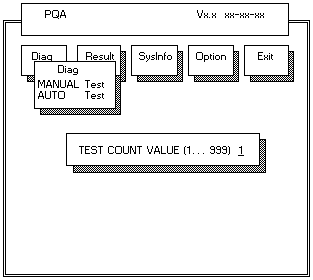
Specify the desired number of tests and press Enter
After you specify the number of tests to perform, the screen shows a list of test items (see below).
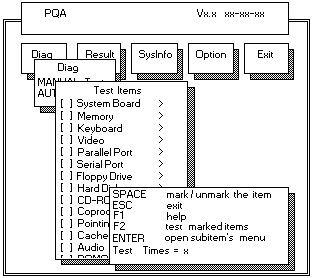
Press
 or
or  to move the highlight bar from one item to another.
Press Space to enable or disable the item. The > mark indicates that there are available suboptions.
Press Enter to view the available suboptions of each selected item.
Press Esc to close the submenu.
The right corner screen information gives you the available function keys and the specified test number.
- Space Enables/disables the item
- Esc Exits the program
- F1 Help
- F2 Test the selected item(s)
- Enter Opens the available suboptions
- Test Times Indicates the number of tests to perform.
NOTE: The F1 and F2 keys function only after you finish configuring the Test option.
Back to

Please see the LEGAL - Trademark notice.
Feel free - send a  for any BUG on this page found - Thank you.