Direct Color Mode
INMOS
XGA Software Programmer's Guide, Sep 91 Looks to include lots of stuff from the
Page 26
4.1.2 Pixel Color Mapping
1,2,4, or 8 bits-per-pixel modes, Palette address is numerical value of pixel.
16 bpp (Direct Color) mode, color mapping is 5 bits R, 6 bits G, 5 bits blue. Sec 4.2
Page 32
4.2 Direct Color Mode: pixel values in video memory directly specify displayed color.
The XGA subsystem can display direct color as a 16 bit pixel where the color fields are shown below. These fields provide the most significant bits of the inputs to the DACs with the color value. Any missing lower order bits are always specified to be '0'
The bits in the 16-bit direct color data word are allocated to the DAC bits as follows.

When selecting this mode, the palette must be loaded with data shown in Figure 4.4. Only half of the palette should be loaded.
Bit 7 of the Border Color Register [BCR] specifies which half to load.
BCR bit 7 = 0, load upper half of palette (locations '80' hex to 'FF' hex).
BCR bit 7 = 1, load lower half of palette (locations "0" hex to '7F' hex).
My understanding...
| Border Color
Register, Bit 7 |
||||
| Bit 7 = 0 |
Bit 7 = 1 |
Red | Green | Blue |
| 80 |
0 |
0 |
0 |
0 |
| 81 |
1 |
0 |
0 |
2 |
| 82 |
2 |
0 |
0 |
4 |
| 83 |
3 |
0 |
0 |
6 |
Figure 4.4 XGA Direct Color Palette Load
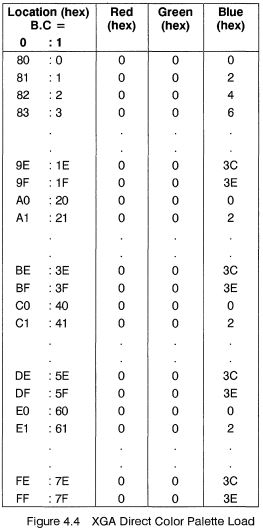
The values in the table above should be written as a byte to the Palette Data Register and have been chosen to ensure future compatibility.
See Sections 11.1.1 and 14.7 for details on this mode.
Coprocessor Functions
The XGA subsystem coprocessor functions do not function in 16 bits-per-pixel mode. However the coprocessor can function in 8 bits-per-pixel mode while data is being displayed in 16 bits per pixel As a result the coprocessor can be used to move data (PxBlt) from one area of memory to another.
When displaying in 16 bits-per-pel and using the coprocessor in 8-bits-per-pel mode, care should be taken when using any of the logical or arithmetic functions because each operation is performed on only 1 byte of data at a time, not the full 16-bits-per-pel.
If using the coprocessor to move data into the Video Display Buffer in 8 bits-per-pixel format, while displaying in 16 bits per pixel mode the width of the destination map should be doubled. See Section 14.7
Page 120
11.1.1 Extended Graphics Mode
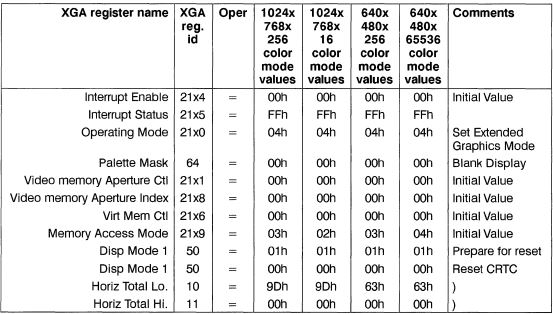
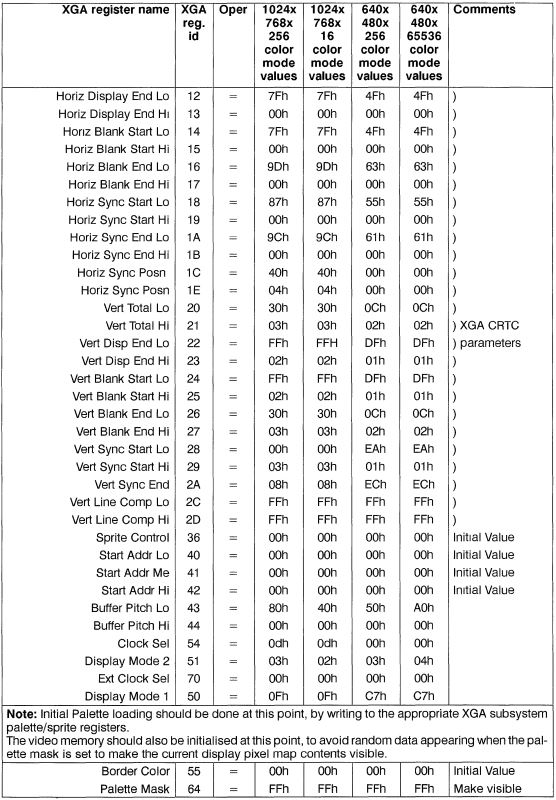
To set the XGA Subsystem into extended graphics mode (subject to the configuration being capable of supporting the required mode as listed in Section 10), write the register values in the sequence shown to the XGA subsystem's registers.
Page 148
14.7 Direct Color Mode
This section deals with matters unique to the Direct Color mode of the XGA subsystem.
14.7.1 Palette Loading
It is necessary to load the palette with a fixed set of values. These are described in Section 4.2.
14.7.2 Coprocessor Support
The XGA coprocessor does not support the 16 bpp mode. This mode is a display mode only and must be programmed using the system processor to access the video memory display buffer directly using one of the system video memory apertures (See also Section 11.2 & Section 13.4).
The processor is not, however, disabled while in this mode. The restriction is rather that the pixel map formats available for coprocessor operations is restricted to 1, 2, 4 or 8 bpp. The graphics coprocessor can be used while in this mode if this is allowed for. Some ingenuity is necessary to achieve useful results using the coprocessor in this way, but the rewards could be justified.
BitBlt Operations By using the PxBlt operations on an 8 bpp bitmap, doubling the dimension width of the bitmaps involved and avoiding arithmetic mixes, BitBlt operations are possible. Use of the 1 bpp pattern and mask maps are possible if carefully considered and calculated.
Text Operations Text operations using the coprocessor PxBlt function rely on 1 bpp pattems. By doubling the width of the individual character bitmap patterns, (interspersing the active bits with zero bits), and writing the high and low order bytes of the required color index separately, Text Operations are possible.
Page 276
16 Bits Per Pixel
As mentioned earlier, TGAXGA.C and XGA16BPP.ASM work exclusively in the
XGA's 16bpp mode. This mode is a bit of an oddity on the original IBM XGA, since the drawing engine doesn't support drawing in 16 bits per pixel (this is remedied in the newer XGA-NI; see Appendix C). This means that on an original XGA, you have to play some games if you want acceleration in this mode. One such "game" was used in InitXGA16(), where I used an 8bpp map to clear the display. Since 16 is 8 times 2, you can perform many of the graphics engine functions simply by doubling both your X position and your width. This applies primarily to filled rectangles and BitBLTs. For a filled rectangle, you just use a source map that is 16 bits (two 8-bit pixels) wide, containing the color you want to fill with. BitBLTs are even simpler, since all you 're doing is copying data that should already be in the right format. Trying to use the line drawing or SSV functions in this mode is pretty hopeless.
The 16bpp mode uses a Direct Color 5:6:5 format, which is odd, because the PC
industry standard is the Direct Color 1:5:5:5 format, originated by Truevision 's TARGA 16 graphics board. IBM's reason for the DC 5:6:5 was twofold. First, it's an IBM internal standard, and second, the human eye is more sensitive to variations in green than in red or blue. Either way, it still looks good.
Initialization of the 16bpp mode is simple. You just perform a regular 640x480 initialization, then update the Display Control 2 register for the proper depth. However, you need to load the palette in a certain way. The first 128 palette entries must be cleared to 0, while the last 128 must have the red and green entries cleared, but the blue entry loaded with a repeating ramp. The blue starts at 0 in entry 128, and then goes up by 8 for each successive blue entry in the palette. After 32 entries it wraps back to 0 to start all over again until all of the last 128 palette entries are loaded. If you don't load the palette this way for the 16bpp mode, you get some very odd looking color on your display.
Once the palette is loaded, and you've set the Display Control 2 and Memory Access Mode registers for 16bpp operation, you're ready to go and look at near-photorealistic color. And, if you bought this book with the disk, you'll find a TGA file with a picture of me attempting to type on a typewriter.
Power Programming the IBM XGA by Jake Richter
page 560
Direct Color
Initially an IBM term for the 16 bpp in the XGA, Direct Color has now become the
VESA method for differentiating between devices that use Indexed Color and ones in which pixel data is passed directly through the DAC, bypassing the LUT. Nonindexed graphics resolutions are referred to by the complete term Direct Color A:R:G:B, where A is the number of bits of the Alpha channel (optional), and R, G, and B specify the number of bits for the red, green, and blue components, respectively. For example, the XGA 16 bpp mode is referred to as Direct Color 5:6:5 (or DC 5:6:5), while the TARGA standard 16 bpp mode is DC 1 :5: 5: 5. True color devices that use 24 bpp can be specified as DC 8:8:8.
High Color
This is a new term derived from Sierra Semiconductor's trademarked HiColor, used to refer to 15 bpp (32,768 color) and 16 bpp (65,536 color) display modes. A VESA suggested methodology for naming color modes, however, is Direct Color
TARGA
TARGA stands for Truevision Advanced Raster Graphics Adapter, and is the name of the first Direct Color PC Graphics board, which set the standard for the 16 bit pixel (DC 1:5:5:5). The TARGA-compatible pixel breaks a 16 bit word into 5 bits (32 levels) of red, 5 bit of green, 5 bits of blue, and 1 bit for video use. Red, green, and blue are the primary color used in color monitors.