Network Settings
Network Settings
If you want to monitor the ServeRAID adapters and controllers across a network, you must switch to client/server mode.
 You can use the Network Settings dialog box to select and connect to servers in the network that
contain IBM ServeRAID adapters or controllers.
To select and connect to a server:
- Click on the icon on the Tool Bar or select Network Settings
from the Options pull-down menu. A screen similar to the following appears.
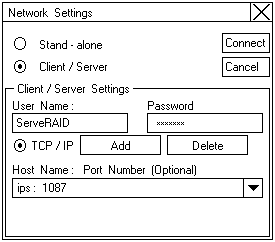
- Click on the Client/Server radio button.
- If security is enabled on the server to which you are connecting, type in your User Name
and Password as defined by the security file on the server to which you are connecting.
(Refer to 'Background-Server Component Security' for information on the security file).
- Type in either the Host Name or the TCP/IP Address of the system, or select it from the pull-down list.
Note: If your server was started on any port other than the default (1087), after the Host Name or TCP/IP Address
that you just entered, type in a colon and the correct port number for your configuration
(for example: ServeRAID:1088).
- Click on Connect to initiate a connection with the remote system.
Please see the LEGAL - Trademark notice.
Feel free - send a  for any BUG on this page found - Thank you.